Showing posts with label Column. Show all posts

Thursday, 21 April 2016

3D Modelling: Column Final Render and Marmoset Turntable

Normal Map

Having baked my pillar in xNormal, these maps were created and saved in my files, a Normal Map and an Ambient Occlusion Map.
This meant that, using these maps, I could generate the column in Marmoset, making a 3D preview of the model.

In Marmoset, the lighting and different maps can be applied and changed.
For this model, I have only used the Normal and Albedo Maps and also the Ambient Occlusion Map.
Ambient Occlusion Map
Column Render


Friday, 15 April 2016

3D Modelling: Column Texture

Primitive View
Front View
Side View
Top View

I chose a grey colour at first but it didn't seem much different from the lambert material in Maya, so I tried a sandy, marble-esque colour but I think I'd have to add additional materials to the model in order to create this affect.

Painting on a UV map with irregular designs and shapes was strange as I couldn't tell a lot of the time which UV shell went where but I think it's gone okay. Although I did miss one part out as can be seen on the side view.

Next time I'll probably take more care in where I place each UV shell or take the time to write which one's which before painting.
Column with cage
Albedo Map

Wednesday, 13 April 2016

3D Modelling: Column Low Poly Model

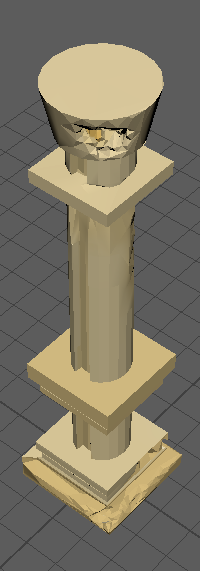
Primitive View
Front View
Side View
Top View

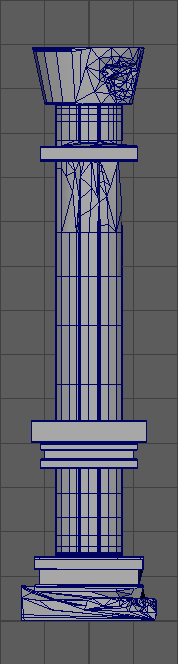
This is the low poly of the column created in Maya by cutting in the decimated version of the high poly to the original Maya model.


Upon reflection of this piece, the smooth preview has been distorted due to missing edge loops when deleting and replacing faces throughout this process.
I started all of the UV Mapping process of each face and section from scratch by selecting each face then either planar or cylindrical mapping. then editing them as I saw fit. I mapped them all out before scaling them and putting them into the top right section of the grid in with the coloured grid for UV mapping.
Primitive View
This was my first time UV mapping properly. It wasn't as bad as I thought it was going to be but it took me roughly 10 hours to complete the UV mapping of the column.

UV Map

Front View
Side View

Front View


Tuesday, 15 March 2016

BA1B Pre-Time Machine/Post Column Process Report

My current work stage is the task of cutting in the decimated zBrush column into a Maya column to create the Low Poly Model. I'm having a bit of trouble connecting the bottom part of the column and some of the edges wouldn't connect so I'm going to try a different method and do it along side my time machine, as a sort of "break-but not break" I guess, and after I complete a set amount of work each day.

This is a rough timetable of how I would ideally like my stages to be complete:
Week 1 (14th) - Design + High Poly
Week 2 (21st) - zBrush + Low Poly
Week 3 (28th) - Texture + Baking
Week 4 (4th) - Materials
Week 5 (11th) - Fixtures

Of course this is subject to change and I will keep a more detailed itinerary in my phone as the time that it takes to build my models depends on what I actually design. I can finish stages and start things early but I don't want to run overboard, if I were to give myself some leeway on the Low Poly as I know I have an event that weekend so perhaps a day or two over.

Ideal times I would like to finish/give to stages:
Monday 14th March -> Friday 18th March - Design
Saturday 18th March -> Tuesday 22nd March - High Poly Model
Wednesday 23rd March -> Thursday 24th March - ZBrush

(This is when I'd like to have my column completely and definitely finished so I can do the Low Poly model of the time machine having had more experience in this section and not have to worry about doing two sets of low poly models, textures and materials at once.)

Friday 25th April -> Monday 4th April - Low Poly
Tuesday 5th April -> Wednesday 6th April - Textures and Baking
Thursday 7th April -> Wednesday 13th April - Materials
Thursday 14th April -> Sunday 17th April - Fixtures/Finishing

After each step I have competed, I will write a blog and if I were not to complete a piece in the time allotted, then I will create a post at the time explaining. These posts will also talk about how I found working to these certain time constraints I have given myself.
I have so much work to do! I guess this will help with my time management. I guess I'll jump straight into it:

Friday, 4 March 2016

3D Modelling: Column Sculpture


Here is the zBrush sculpture I created after modeling my column in Maya. These four screenshots show the damage from each view of the column. This is without texture or noise and has the standard brown clay material featured in the zBrush settings.
After refining the sculpture, I decimated down to around 1000 points to get this Medium Poly Model. I used the default zBrush material so it would be easier to see how the column looked while I decimated it. This has been saved as an .OBJ and will be cut into Maya to make the Low Poly Model.


Sometimes I felt as though I didn't include enough wear and tear on my column but again, as these things are the first times I'm doing them, I'd like to make them pretty simple in order to not overwhelm and so I can learn the processes with as little issues and confusion as possible.

Sunday, 28 February 2016

3D Modelling: Column Design and Model


These are some of the references I used to create ideas for my column.

I wanted to do something simple so I could focus on the technical side of things and get the hang of the process before doing things more completed which I know would only stress me out...
Primitive Preview

After creating different iterations, I set on modelling the column in Maya.

I don't know if it's the simple design I chose or the fact that I may not be no longer such a beginner with Maya but things like adding edge loops and snapping shapes to others seemed much more easier than the other times I used Maya.

Although this design isn't a difficult one, making this piece has given me more confidence to create something more elegant with more features in the future. I know understand more about how to do things and the features and keys/shortcuts  in Maya and what they do and how to use them.

I'm still not very confident though, but I think I'm getting there. I just need more practice.. and more time!

Front View
Side View
Smooth Preview